
CapTune1.8.1 - Get APK
You'll be able to download in few seconds.
Publisher Description
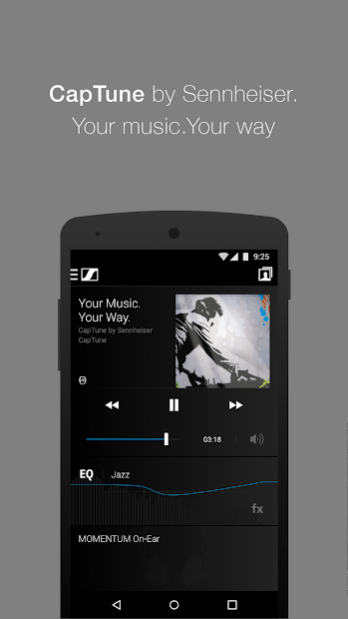
Your Music. Your Way.
Introducing CapTune by Sennheiser.
CapTune is a premium music player and a powerful sound optimisation tool for your headphones, putting you in control of the music you love. Make precise adjustments with the equalizer or simply choose presets and effects to fit your taste, mood or surroundings. And then, save your Sound Profiles to suit your listening environment and personalise your listening experience anytime, anywhere.
What’s more, CapTune works seamlessly with DLNA enabled devices and integrates TIDAL so you can create your own multi-source playlists.
Key Features:
– Integration of player and equalizer in one app
– SoundCheck to set personal equaliser by A/B listening tests
– Equalizer presets and effects; created by Sennheiser, personalized by user
– Control stored and streamed music and create multi–source playlists
– Integration with TIDAL’s high fidelity music streaming (availability of services depends on region)
– Sound Profiles save your music and settings for different listening situations
– Smart user interface
– Compatible with wired and wireless Bluetooth as well as DLNA devices
– Colour design themes to match headphones and taste
Player & Equalizer Facts
– Plays MP3, AAC, FLAC, OGG and WAV audio files (may vary in regards to device capabilities)
– Automatic import of local music library and third party playlists
– Real-time spectrum analyzer
– 7 band equalizer and 14 band free curve equalizer
– Both equalizers also available in landscape mode
Product specific features of CapTune:
– Control and individualize the new PXC 550 Wireless travel headset
– Well balanced spatial boost for Sennheiser Momentum series
– Momentum specific colour themes
About CapTune
The company that develops CapTune is Sennheiser electronic GmbH & Co KG. The latest version released by its developer is 1.8.1.
To install CapTune on your Android device, just click the green Continue To App button above to start the installation process. The app is listed on our website since 2018-09-05 and was downloaded 0 times. We have already checked if the download link is safe, however for your own protection we recommend that you scan the downloaded app with your antivirus. Your antivirus may detect the CapTune as malware as malware if the download link to com.sennheiser.captune is broken.
How to install CapTune on your Android device:
- Click on the Continue To App button on our website. This will redirect you to Google Play.
- Once the CapTune is shown in the Google Play listing of your Android device, you can start its download and installation. Tap on the Install button located below the search bar and to the right of the app icon.
- A pop-up window with the permissions required by CapTune will be shown. Click on Accept to continue the process.
- CapTune will be downloaded onto your device, displaying a progress. Once the download completes, the installation will start and you'll get a notification after the installation is finished.
Program Details
System requirements
Download information
Pricing
Version History
version 1.8.1
posted on 2018-09-05
Performance optimization and bugfixes
Compatible with Android P
version 1.8.0
posted on 2017-09-24
Performance optimization and bugfixes
version 1.1.3
posted on 2016-06-20
- Control and individualize the new PXC 550 Wireless travel headset,- Sign up for TIDAL via CapTune for a free 90 days trial,- Bugfixes
Disclaimer
External Download
We do not host CapTune on our servers. We did not scan it for viruses, adware, spyware or other type of malware. This app is hosted by Galad and passed their terms and conditions to be listed there. We recommend caution when installing it.
The APK Download link for CapTune is provided to you by apps112.com without any warranties, representations or guarantees of any kind, so access it at your own risk.
If you have questions regarding this particular app contact the publisher directly. For questions about the functionalities of apps112.com contact us.
